Vehicles Manager
What Does a Daily Vehicle Status Board Look Like for a Small Fleet
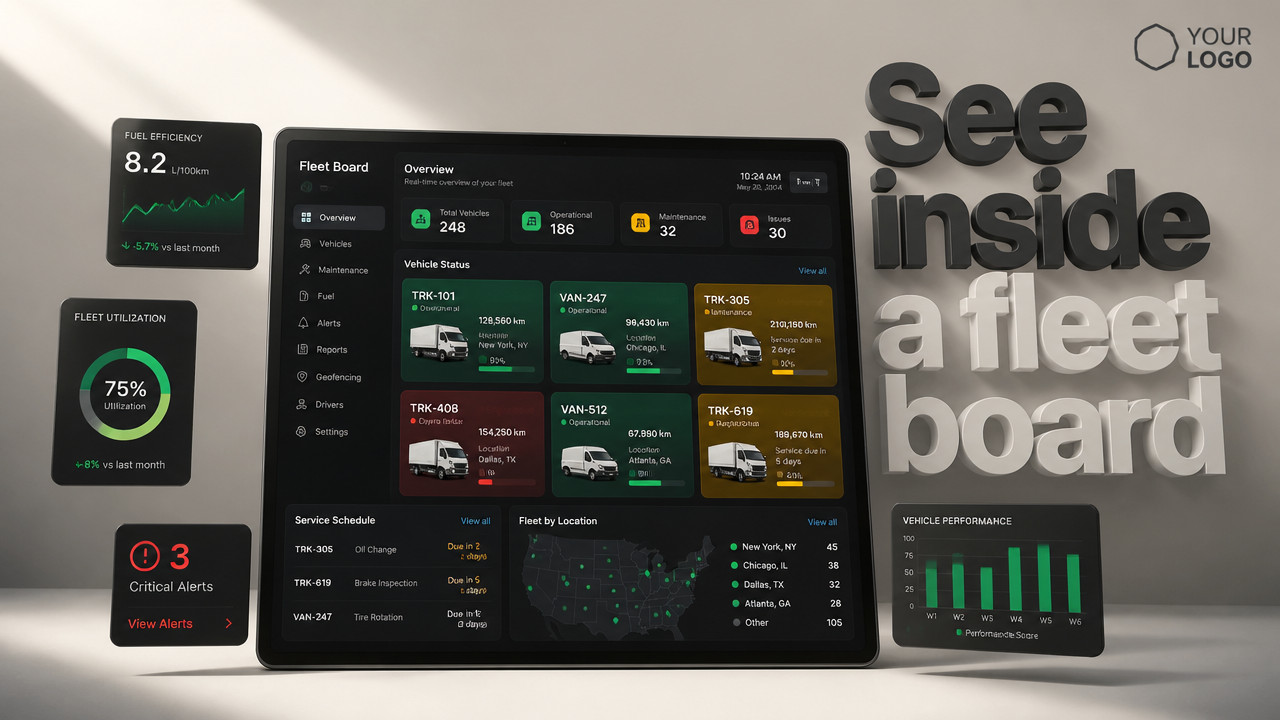
A daily vehicle status board for a small fleet shows one row per vehicle with three states: ready, shop, or due for service. It replaces the spreadsheet and WhatsApp chaos that sends vans already marked down at 6:00 a.m. For 10-60 vehicles, the board displays unit number, vehicle type, current status, shop notes if applicable, and next service date all visible to dispatch, yard managers, and the shop in real time without version conflicts or duplicate entries.
Three-Column Layout: Unit, Status, Next Service
The core of any functional fleet readiness board comes down to three columns. Anything more creates clutter. Anything less creates confusion. The layout answers one question at 6:00 a.m.: which vehicles can leave the yard?
Column one holds the unit identifier. This is the number painted on the door or the license plate. It goes first because that is how the yard identifies the vehicle, not by VIN orAsset tag. When a mechanic shouts "Unit 12," everyone knows which van that means.
Column two shows the current status: ready, shop, or due for service. This column is the decision point. Ready means the vehicle can take a job. Shop means it cannot leave. Due for service means it needs attention before the next trip or that it has upcoming maintenance scheduled within a window the manager sets.
Column three displays the next service date. This column prevents the question "when was the last time that truck saw a mechanic?" It gives dispatch and the yard manager a forward-looking view, not a rearview mirror of expired inspections and missed oil changes.
A live readiness board keeps these three columns visible to everyone who needs them. No emailing files. No saving versions. No wondering if the spreadsheet on the dispatcher's screen matches the one the shop supervisor edited five minutes ago.
| Unit ID | Vehicle Type | Current Status | Next Service Date |
|---|---|---|---|
| V-101 | Cargo Van | Ready | 2026-02-15 |
| V-102 | Flatbed Truck | Shop | 2026-02-20 |
| V-103 | Pickup | Due | 2026-01-28 |
| V-104 | Box Truck | Ready | 2026-03-01 |
| V-105 | Service Van | Shop | 2026-02-10 |

Color-Coded Status Indicators Stop Double-Booking
Columns work for reading. Color works for seeing. A vehicle availability tracker that uses color coding prevents the most expensive mistake a small fleet makes: sending a vehicle that is already in the shop.
Green means ready. The unit can take a job. The keys are on the board. The driver can load and leave. Dispatch looks for green.
Red means shop. The unit is down. Maybe it broke yesterday. Maybe it is waiting on parts. Either way, dispatch cannot assign it. Red stops the 6:00 a.m. conflict where two people mark the same van differently and nobody notices until the driver is already standing at the key hook.
Yellow means due for service. The unit runs but has maintenance approaching. Dispatch can send it on a short job, or the yard manager pulls it for preventive work before it becomes a red. Yellow is the warning shot.
According to Jodoo, many small fleet management systems use color-coded status boards to quickly indicate vehicle availability, allowing managers to spot problems across the yard in seconds rather than scrolling through rows of text.
A contractor fleet board makes this visible before the morning rush. When the shop marks a unit red at 5:45 a.m., dispatch sees it at 5:46 a.m. Not after the driver has already loaded tools and is standing in the yard looking for a van that will not start.
- Green (Ready): Vehicle is operational, keys available, cleared for dispatch immediately.
- Red (Shop): Vehicle is down for repairs, cannot be assigned, dispatch must select another unit.
- Yellow (Due): Vehicle is operational but has upcoming service, use for short jobs or schedule maintenance.
[2026 Data] Real-Time Updates Replace Spreadsheet Versions
The spreadsheet is the problem. Not because spreadsheets do not work, but because they do not sync. In 2026, small fleets still run their morning dispatch board from Excel files that live on one person's desktop. When that person is out, the yard stops.
Real-time updates eliminate the file-save race. A fleet status dashboard that updates instantly means the shop supervisor marks Unit 12 as "shop" and the dispatcher sees that mark without refreshing a file, without downloading a new version, without calling anyone to confirm.
The single-source-of-truth model works because there is only one board. Not the spreadsheet, not the WhatsApp thread, not the whiteboard that nobody updated yesterday. One board, one status per vehicle, visible to every role that needs it.
According to Gomotive, real-time visibility into vehicle operational status is one of the most significant shifts in fleet management since 2024, with small fleets adopting live boards to replace static files that created version conflicts throughout the workday.
A rental fleet status board addresses the same problem for rental operations. The booking calendar says the car is available. The key hook says it is out. By lunch, a customer is standing in the lot waiting for a vehicle that is actually in the shop. Live status prevents that mismatch.
Shop Notes Sit on the Vehicle, Not in a Thread
WhatsApp threads get buried. A mechanic types "transmission back Friday" into the group chat at 9:00 a.m. By 11:00 a.m., fifty messages have pushed it off the screen. Dispatch never sees it. The van gets assigned anyway.
A yard management system that places shop notes directly on the vehicle row keeps the information where it belongs. The note travels with the status. Anyone who checks Unit 12 sees that it is in the shop and why it is in the shop. No scrolling. No searching. No asking "did anyone hear what happened to that flatbed?"
The note stays until someone removes it. If the transmission job takes until Saturday instead of Friday, the shop updates the note. Dispatch adjusts. The municipal department board works the same way: one note per vehicle, visible to the yard, the shop, and the department head who needs to know when the truck returns to rotation.
Shop notes should be short. The goal is not a full repair order. The goal is enough information to answer "when will this unit be ready?" and "what is wrong with it?"
- "Transmission back Friday" tells dispatch when to expect the unit.
- "Tire rotation" short job, unit returns same day.
- "Inspection overdue" unit cannot leave until legal compliance is met.
- "Oil change today" routine service, vehicle available after noon.
Role-Based Views: Dispatch Sees Ready, Shop Sees All
Not everyone needs to see everything. Dispatch needs to see which vehicles are ready. The shop needs to see every vehicle, including the ones that are down. The owner needs to see the whole picture without getting bogged in details.
Permission layers make this work without IT complexity. A fleet visibility tool with role-based views lets each person filter to what matters for their job. The dispatcher scrolls for green. The shop supervisor scrolls for red and yellow. The owner checks the morning roster and moves on.
This is not about hiding information. It is about focus. A morning dispatch board with 60 rows and three columns is already a lot to scan. If dispatch has to filter out the shop units manually, mistakes happen. If the board filters automatically, dispatch sees only what can leave.
A shuttle fleet readiness board uses the same logic. Drivers see their assigned vehicle. Operations sees the full roster. Maintenance sees what needs attention. Each role gets the view that matches the decision they need to make.
| Role | Default View | Can Edit Status | Can Add Notes |
|---|---|---|---|
| Dispatch | Ready vehicles only | No | No |
| Yard Manager | All vehicles | Yes | Yes |
| Shop/Maintenance | Shop and Due vehicles | Yes | Yes |
| Owner | All vehicles | Yes | Yes |
How to Build Your First Daily Status Board in 15 Minutes
Setting up a daily fleet roster does not require a consultant, a hardware installation, or a multi-year contract. The process takes about 15 minutes from vehicle list to first morning dispatch.
Start with what you already have: a list of vehicles. This might be in a spreadsheet, on a whiteboard, or in someone's head. The list needs four things per vehicle: unit ID, type, current status, and next service date. If you do not know the status, mark everything ready and let the shop update from there.
The board goes live as soon as you invite the team. The yard manager, the shop supervisor, and dispatch get access. Each person sees the same board. Each person edits in real time. No file saves. No version control. No wondering if you are looking at the latest update.
Pricing stays simple: $2.99 per vehicle pricing with no GPS requirement and no long-term commitment. The board works for what the board does showing readiness, not location.
- Paste your vehicle list Copy 10-60 units from your existing spreadsheet or list.
- Assign initial statuses Mark each unit ready, shop, or due based on what you know today.
- Add next service dates Enter upcoming maintenance or inspection dates where available.
- Invite your team Add yard manager, shop, and dispatch by email or phone.
- Run your first morning board Check the board at 6:00 a.m. and dispatch from what you see.
Integration with Maintenance Scheduling Prevents Overdue Units
Next-service dates are not just calendar entries. They are the boundary between operational and overdue. A vehicle that misses inspection dates runs legal risks. A vehicle that skips oil changes runs mechanical risks. A fleet status dashboard that integrates with maintenance scheduling flags those risks before they become breakdowns.
According to Autosist, modern small fleet status boards often integrate with maintenance scheduling systems, allowing managers to see which vehicles are due for service and preventing overdue units from slipping through the cracks during busy weeks.
The integration works in one direction for most small fleets: the board shows the date, and the manager schedules the work. For fleets with more complex needs, the board can push alerts when dates approach. Either way, the information sits where dispatch can see it, not buried in a separate maintenance log.
A trades fleet board uses this integration to keep crews moving. Electrical contractors, plumbers, and HVAC teams cannot afford to have a van pulled over for an expired inspection sticker. The yellow status catches that problem before the van leaves the lot.
Key Takeaways
A daily vehicle status board solves the spreadsheet problem. It replaces the file that only one person can edit, the WhatsApp thread that gets buried, and the morning confusion over which van is in the shop. The board is simple by design: one row per vehicle, one status per row, visible to everyone who needs it.
- Three-column layout Unit ID, current status, next service date provide the minimum viable information for dispatch decisions.
- Color-coded status Green, red, and yellow indicators enable instant visual recognition across the yard.
- Real-time sync Single-source-of-truth updates eliminate version conflicts between dispatch, yard, and shop.
- No GPS required The board answers whether the vehicle can leave, not where it goes after it leaves.
A movers fleet status board operates on the same principle. Movers, contractors, and rental fleets all need to know one thing each morning: what can roll. The daily board answers that question before the first driver arrives.
Frequently Asked Questions
We already use Excel. Why switch?
Version conflicts create dispatch errors. Excel works until two people edit the same file and dispatch sends a van that is marked "shop" in the version the shop supervisor is looking at. By the time the mistake surfaces, the driver is already loaded and the job is delayed. A live board prevents that by showing one status to everyone, updated in real time.
Do we need GPS to use a status board?
No. GPS tells you where the vehicle is. The board tells you whether it is allowed to leave. Fleets that already have telematics often add a status board because GPS cannot answer the readiness question. Location is not permission.
How long does setup take?
About 15 minutes for 10-60 vehicles. Paste your list, assign statuses, invite the team. No hardware to install, no multi-day onboarding, no consultant required. The board works from day one.
What does it cost?
$2.99 per vehicle per month. No contract length required, no GPS hardware fees, no per-user charges. The price scales with fleet size and stops if the fleet stops.
Do we need a contract?
No multi-year commitment. Small fleets often avoid software specifically because of three-year lock-ins. The board operates month to month. If it stops being useful, you close it without penalty.
A landscaping fleet management board follows the same terms. Landscapers, contractors, and rental operators all need flexibility during slow seasons. The pricing model reflects that reality.
Fri Oct 02 · Josh B