Vehicles Manager
What Tools Help Small Fleet Managers See Which Vehicles Are Ready to Deploy
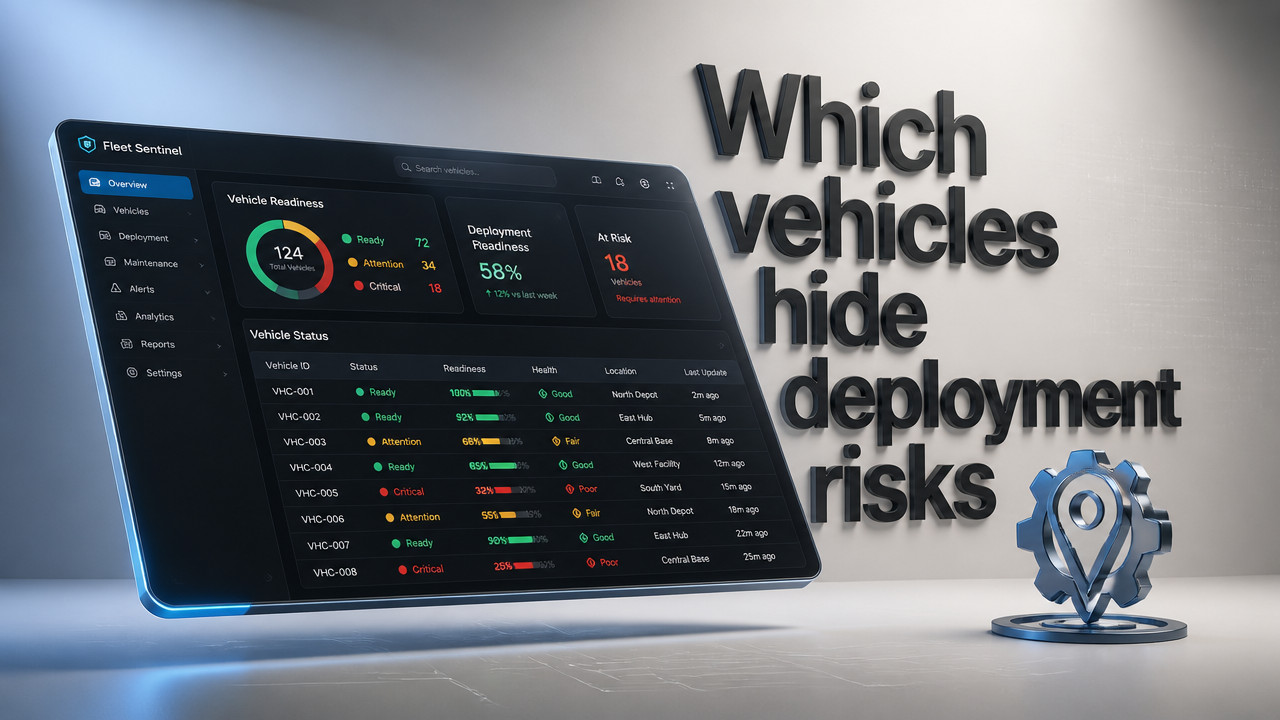
Small fleet managers in 2026 need tools that answer a single morning question: which vehicles can actually leave the yard today. GPS tells you where a van is, not whether it's cleared for dispatch. Readiness tools replace the spreadsheet-and-WhatsApp chaos by showing three states on one board ready, in shop, or due for service so the van marked "in shop" at 6 a.m. doesn't still get sent out. These tools focus on operational status, not location tracking, and they solve the gap between what the calendar says and what the yard knows.
Quick Answer: Status Boards Replace the Morning Spreadsheet Fight
Readiness tools are status trackers, not location devices. They answer the deployment question that GPS cannot: is this vehicle allowed to leave? A vehicle readiness board displays operational status in real time, replacing the morning spreadsheet fight that happens when two people mark the same van differently. The core function is simple show one row per vehicle with a single source of truth.
The three-state model cuts through the noise that complex fleet management software creates. Instead of seventeen status codes or multi-tab databases, a readiness board shows three options: ready, in shop, or due for service. This clarity prevents the 6 a.m. dispatch error where a van marked "shop" still gets sent because the shift supervisor didn't see the latest spreadsheet update.

Location-only tools miss the yard-level reality. A GPS pin shows the van at the shop, but the dispatcher doesn't know if it's there for an oil change or a week-long transmission rebuild. Fleet readiness tools close that gap by showing whether the vehicle is cleared for deployment, not just where it's parked. For yards running on live readiness boards, the morning question gets answered before the coffee gets cold.
- Ready: Vehicle passed inspection, has no open shop order, and is cleared for dispatch today.
- In Shop: Active work order exists. Vehicle cannot leave until shop marks it complete.
- Due for Service: Inspection or maintenance coming due within set window. Flagged before breakdown risk.
Why GPS and Fleet Tracking Platforms Miss the Deployment Question
GPS answers "where," not "whether." A telematics platform shows the van on the map, its fuel level, and its route history. But when the yard manager needs to know if that Ford Transit can pick up the 7 a.m. crew, the map doesn't help. The gap between location data and deployment status is where small fleets lose hours every week.
Fleet tracking platforms focus on routing, fuel optimization, and driver behavior. Those matter for large operations with dedicated dispatch desks. But for the 10-to-60-vehicle contractor or rental yard, the morning pain point isn't route efficiency it's knowing which three trucks can leave and which two are still in the shop. The spreadsheet says one thing, the WhatsApp thread says another, and the person who knows the truth is on vacation.
According to Spytec, GPS fleet tracking adoption continues to rise among commercial operators, but adoption doesn't solve the readiness gap. Yards install tracking hardware expecting clarity, then realize the platform wasn't built to answer the yard-exit question. Vehicle deployment tools fill that space by focusing on status, not coordinates.
The yard-level gap creates real costs. A rental desk hands keys to a car that's still in the shop. A contractor sends a crew to a site in a van with expired inspection tags. The booking calendar and the key hook disagree by lunch. These aren't tracking problems they're status problems, and they require status-first solutions.
The Three-State Readiness Model: Ready, In Shop, Next Service
Each state in the three-state model maps directly to a yard decision. "Ready" means the vehicle passed its morning check, has no open work orders, and can be dispatched now. "In Shop" means a mechanic has it, and dispatch should stop trying to send it. "Due for Service" means the vehicle is still operational but flagged for upcoming maintenance, so the yard manager can plan around it.
Yard examples make this clear. A contractor's F-150 shows "Ready" at 5:45 a.m. The shop technician marks it "In Shop" at 6:10 for a brake issue. The dispatcher sees the status change on the board and assigns a different truck. No phone call, no WhatsApp argument, no showing up to the site with a truck that can't pass inspection.
Single-row status prevents double-dispatch because only one status can exist at a time. The spreadsheet allows conflicting marks the night shift logs "ready" at 10 p.m., the early shift marks "shop" at 6 a.m., but dispatch still sees last night's file. A fleet availability software platform overwrites the row in real time, so when the shop changes status, everyone sees it immediately.
More states create noise. Enterprise systems offer fifteen status codes plus sub-statuses, custom fields, and workflow approvals. For a fifteen-truck plumbing contractor, that complexity doesn't help. It creates training overhead and slow adoption. Three states match the actual decisions yards make: send it, don't send it, or plan ahead.
| Three-State Model | Multi-Status Systems |
|---|---|
| One status per vehicle | Multiple overlapping fields |
| Real-time single source of truth | Spreadsheet version lag |
| Ready / Shop / Due | 15+ custom status codes |
| Minutes to train | Weeks of onboarding |
| No hardware required | GPS hardware contracts |
| Immediate adoption | Resistance from field staff |
Rental yards and municipal pools face the same problem across multiple locations. A rental fleet status tracking system shows which car is on which lot and whether it's ready. Without that visibility, the desk agent reserves a car that's actually in the body shop, and the customer stands waiting.
How Small Fleets Track Vehicle Readiness Without Enterprise Software
The morning workflow for a readiness-first tool starts before the first truck leaves. The yard manager opens the board, sees the fleet list filtered by status, and makes dispatch decisions. No digging through tabs, no cross-referencing WhatsApp threads, no calling the shop to confirm.
Setup happens in minutes, not months. A contractor uploads a vehicle list often pasting from the existing spreadsheet and the board populates. Each vehicle gets one row. The shop technician marks status from a phone. The dispatcher sees updates instantly. Compare that to enterprise ERP implementations that require multi-month rollouts, custom integration, and dedicated IT support.
Pricing matters for small fleets that don't have procurement departments. At $2.99 per vehicle, a 20-truck fleet pays less than $60 per month for readiness visibility. No GPS hardware to install, no multi-year contract to sign. The simple per-vehicle pricing model removes the commitment barrier that keeps yards stuck in spreadsheet purgatory.
- Step 1: Paste or upload vehicle list fleet numbers, types, and lot assignments.
- Step 2: Set initial status for each vehicle based on current shop orders.
- Step 3: Shop team marks vehicles "In Shop" or "Ready" from mobile device.
- Step 4: Dispatcher filters board by status and assigns ready vehicles to jobs.
Shop Management Integration: When "In Shop" Actually Stops Dispatch
The "In Shop" status only prevents dispatch if it updates in real time and everyone sees it. Offline tools create dangerous lag. The mechanic writes "brake job" on a whiteboard at 7 a.m., but the dispatcher is working from last night's spreadsheet. At 7:30, the van gets assigned to a job site. By 8:15, the crew is stranded with a truck that can't stop safely.
Real-time shop status changes the equation. When the technician marks a vehicle "In Shop" on the board, that status propagates immediately. The dispatcher filtering by "Ready" vehicles won't see it. The yard manager checking availability won't assign it. Contractor fleet shop tracking closes the gap between the lift and the dispatch desk.
Inspection-due flags add another layer of protection. A vehicle might be mechanically sound today, but if the annual inspection expires next week, the board shows "Due" status. The yard manager sees it during morning dispatch and schedules maintenance before the deadline. Proactive beats reactive, especially when reactive means a failed DOT inspection or a customer stuck with an unroadworthy rental.
The alternative waiting for breakdowns costs more than preparation. A truck that fails on-route requires emergency towing, lost billable hours, and frustrated customers. Operational status tracking catches problems before they leave the yard, not after.
Multi-Lot and Multi-Yard Visibility: Who Owns Which Vehicle Right Now
Rental companies and municipal fleets often operate across multiple locations. A car rented from the downtown lot gets returned to the airport. A municipal truck moves between depots based on project needs. The spreadsheet doesn't handle this well each location keeps its own file, and headquarters never has the full picture.
Status boards solve multi-lot confusion by filtering vehicles by location. The rental desk agent sees only the downtown lot on their screen. The airport team sees their inventory. The manager sees both. When a customer returns a car to the wrong lot, the board updates, and both locations know immediately.
Double-assignment happens when lots don't communicate. The booking system says the Toyota Corolla is available downtown. The whiteboard in the shop says it's in service. The customer gets promised a car that won't start. Municipal fleet boards and rental readiness tools show lot assignment and status on the same row, so the desk never promises what the shop can't deliver.
The morning board runs from one person's spreadsheet in too many yards. When that person is out, nobody knows the full picture. A centralized deployment dashboard removes the single point of failure. Anyone with access can see what's ready, what's in shop, and what's coming due no tribal knowledge required.
Inspection and Service Due Flags: Catching Issues Before the Customer Arrives
The next-service field prevents compliance gaps that turn into expensive problems. A rental car with overdue inspection can't legally be handed to a customer. A contractor's truck with expired tags gets pulled over, costing the driver's time and the company's reputation. The board shows "Due" status before those deadlines arrive.
Consider the rental scenario. A guest stands at the desk at 8 a.m., reservation in hand. The agent types the confirmation number into the booking system. It returns a Toyota RAV4. But the RAV4 is still in the shop from yesterday's check-engine light. The agent doesn't know. The keys get handed over. Ten minutes later, the customer returns angry because the car won't start.
Proactive readiness means catching that mismatch before the keys move. The board shows the RAV4 in "Shop" status. The agent sees the flag, finds a different vehicle marked "Ready," and the guest leaves on time. Fleet inspection management prevents the morning drama that costs repeat business.
Shuttle fleets face similar pressure. A hotel's airport shuttle needs to be roadworthy every hour of the day. Missing an inspection deadline means grounded vehicles and angry guests. Shuttle fleet inspection tracking displays due dates in the same interface as shop status, so the operations manager sees what needs attention before it becomes urgent.
Key Takeaways: What Readiness Tools Actually Solve in 2026
The gap between calendar plans and yard reality is where small fleets lose money. The reservation system says twelve cars are available. The shop knows only eight are roadworthy. The spreadsheet hasn't synced. The WhatsApp thread is thirty messages deep. By the time the truth surfaces, a customer is waiting and a dispatcher is scrambling.
Status-first tools close that gap. They don't try to replace the booking system or the accounting software. They answer one question: which vehicles can leave the yard right now. That clarity ripplesthrough the morning dispatch, the rental desk, and the shop floor.
Trades fleet readiness tools give contractors, landscapers, and service companies a replacement for the spreadsheet-WhatsApp coordination that fails every time the person who owns the file is out. No GPS contract, no hardware installation, no enterprise pricing. Just status visibility that matches how yards actually operate.- Readiness tools answer the deployment question GPS cannot whether a vehicle can leave, not just where it is.
- The three-state model (Ready, Shop, Due) prevents double-dispatch by providing a single source of truth.
- Real-time shop status stops dispatchers from sending vehicles that mechanics know are unfit.
- Multi-lot filtering prevents double-assignment across rental locations and municipal depots.
- Inspection-due flags catch compliance issues before customer handoffs or DOT inspections.
FAQ: Small Fleet Vehicle Readiness Tools
Do readiness tools replace GPS fleet tracking?
No. Readiness tools serve a different function. GPS tracks location; readiness tools track operational status. A vehicle might be parked on the lot (GPS shows it there) but flagged "In Shop" for brake work (readiness board blocks dispatch). Small fleets often use both, but for yards that can't justify GPS contracts, readiness tools alone solve the morning dispatch question at a fraction of the cost.
How much do vehicle readiness tools cost?
Pricing starts around $2.99 per vehicle per month for basic status-tracking platforms. That means a 20-vehicle fleet pays under $60 monthly. Compare that to GPS telematics contracts that often run $25-$40 per vehicle monthly plus hardware costs. The readiness model avoids multi-year commitments and equipment installation, making it accessible for contractor and rental yards that can't justify enterprise pricing.
How long does it take to set up a readiness board?
Most small fleets get started in 15 minutes or less. Setup involves pasting a vehicle list into the platform often exported from the existing spreadsheet and setting initial statuses. No hardware installation, no wiring into vehicle OBD ports, no technician visit. Compare that to telematics rollouts that require scheduled installs and multi-week deployment plans.
Can readiness boards handle multiple lots or locations?
Yes. Vehicles can be assigned to specific lots, and users can filter the board by location. The rental desk at the downtown lot sees only their inventory; the airport team sees theirs. Managers with cross-location access see the full picture. This prevents double-assignment when a car is parked at one lot but booked from another. Landscaping fleet management and rental operators use this feature to coordinate across job sites and branches.
What if my team resists switching from spreadsheets?
Familiarity keeps yards stuck in spreadsheet chaos, but the resistance usually dissolves after one bad morning. The van marked "Shop" that still gets sent. The rental customer who waits forty minutes for a car that's in service. Once the yard experiences that pain, the motivation to change appears. Readiness tools require minimal training three statuses, one row per vehicle so adoption happens faster than with complex fleet management systems.
Fri Oct 09 · Josh B